Ir al contenido
¡Bienvenido al módulo « currículo educativo »!
En este módulo descubrirás nuestro programa interactivo en línea « currículo educativo », que dota a los alumnos de competencias tecnológicas, emprendedoras y de liderazgo a través del aprendizaje basado en proyectos. ¡Las traducciones de « currículo educativo » están disponibles en 17 idiomas!
Los alumnos desarrollan sus proyectos con la ayuda de contenidos interactivos en línea y actividades prácticas.
Nuestras vías de formación « currículo educativo », que se distinguen del resto, favorecen itinerarios de aprendizaje flexiblesque pueden adaptarse a cada contexto.
La guía para estudiantes currículo educativo incluye consejos integrados de Mentor. La guía para mentores currículo educativo contiene plantillas para la planificación de clases.
currículo educativo SCOPE
Qué hacen y aprenden los estudiantes
Investigar los problemas de la comunidad
Idear soluciones que aprovechen la tecnología
Práctica de codificación y desarrollo de IA
Diseñar y desarrollar una solución digital
Desarrollar un emprendedora
Crear un « Video » para presentar sus ideas
⏰ Calendario flexible
El « currículo educativo » se puede adaptar a distintos plazos. Recomendamos que se conceda a los alumnos entre 40 y 60 horas para utilizar el « currículo educativo » y desarrollar sus proyectos.
Las lecciones incluyen
Objetivos de Desarrollo Sostenible
Technovation se basa en los 17 Objetivos de Desarrollo Sostenible de las Naciones Unidas para ayudar a los alumnos a analizar problemas del mundo real y diseñar soluciones eficaces para sus comunidades.
Nuestro programa « currículo educativo » incluye10 módulos didácticos específicos sobre los ODSy un « videos » técnico seleccionado por antiguas alumnas, con el fin de ayudar a los alumnos a abordar los problemas globales que afectan a su comunidad.
 Descubre las rutas de los ODS de Technovation
CÓMO UTILIZAR EL currículo educativo
Estructuración de las sesiones
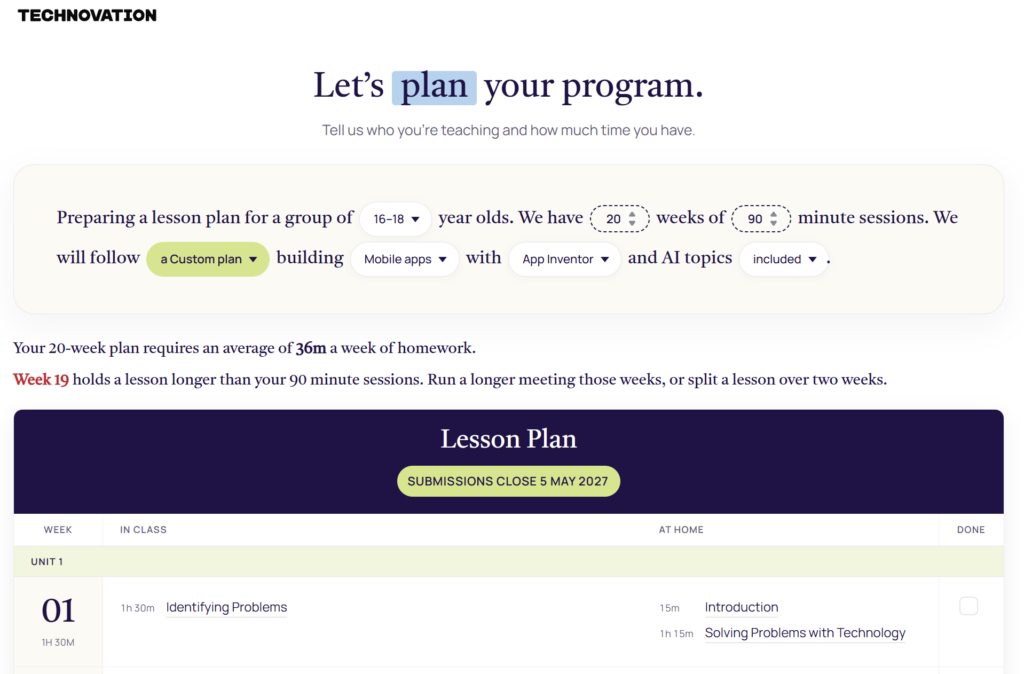
¡Utiliza nuestro nuevo generador de mapas personalizados de « currículo educativo »para planificar el contenido de cada sesión!
Adapta el « currículo educativo » a tu calendario y tus objetivos:
- Completa currículo educativo – ¡Guía completa sobre el desarrollo de proyectos con abundante contenido sobre la investigación de problemas, la programación y las herramientas de IA, y mucho más!
- Contenido principal currículo educativo – una versión resumida de la « currículo educativo » que contiene la información básica necesaria para presentar un proyecto.
Durante las sesiones, céntrate en las lecciones más relevantes y en las actividades relacionadas con la elaboración del proyecto. Los alumnos pueden completar algunas partes de la guía « currículo educativo » fuera de las sesiones.
Organizar sesiones con varios equipos
Divide el tiempo de la sesión entre:
- Actividades en grupo (talleres de habilidades, presentaciones)
- Tiempo de trabajo en equipo (proyectos, planificación)
Alterne entre la enseñanza en grupo y el trabajo en equipo. Empiezan juntos, se dividen en equipos y luego se reagrupan para compartir los progresos.
currículo educativo Recursos de planificación
¡Haz clic en la imagen de abajo para crear un mapa personalizado de « currículo educativo »!
MENTOR currículo educativo
Ofrecemos un completo currículo educativo para los mentores, con el fin de ayudarles a prepararse para las reuniones de equipo.
El paquete « currículo educativo » de Mentor incluye:
El video que figura a continuación ofrece una visión rápida del currículo educativo de Mentor y de los temas, objetivos y actividades fundamentales que abarca.
Estamos actualizando esta página web para reflejar nuestra nueva orientación. La imagen de marca renovada y la misión ampliada de Technovation ya están disponibles en technovation.org. Tus recursos de « currículo educativo » y de los concursos seguirán estando aquí mismo.
Descubre las novedades