- Identify the essential parts of a pitch deck
- Be concise and impactful when making slides for a pitch deck
- Gain some tips on how to create and present a strong pitch deck
A pitch deck is one of the most essential communication tools you’ll use as a startup founder. Its purpose is not only to tell your story, but to tell it in a way that engages, persuades, and inspires your audience. A strong pitch deck helps people believe in your idea, understand its potential, and take the next step with you.
Like any entrepreneurial communication, your pitch deck should adapt to the audience you’re speaking to. However, there are core components that most successful pitch decks share. In this lesson, we will walk through those essential slides and how to build them effectively. You will notice that many elements connect directly to your Lean Canvas, so keep it nearby as you work.
You will also have access to a sample pitch deck. It is intentionally simple so you can clearly see the purpose of each slide. The speaker notes summarize the intent behind each section. While there is flexibility in how you design your own deck, only change the slide order or structure if you have a strong reason to do so.
Before You Begin
How Your Pitch Will Be Judged
For this program, you will submit a pitch deck, a demo video, and a link to your working product. Judges will evaluate your venture using the following rubric. Understanding these criteria will help you prioritize what to highlight in your slides.
From Pitch Elements to Pitch Deck
This lesson builds directly on the work you did in the previous lesson. A pitch deck is simply a structured, visual way to deliver those same pitch elements, with some adaptation (the pitch deck in this lesson will serve you well in most situations and it especially catered to this competition). Keep your worksheet from Unit 12 close by as you craft your slides.
Essential Slides
1 Opening
Your first slide sets the tone and establishes clarity immediately. It should tell the audience what your startup is about in a single glance. Include your company name and a short, memorable one-line statement that explains what you do. The goal is to hook attention and make the audience want to hear more.
Example: YouTube’s early pitch deck opening slide communicated its core value proposition

Pitch Element: Hook
Your hook still anchors the entire pitch. In a deck, it shows up immediately as your opening statement and framing.
2 Problem
This slide explains the real-world issue your startup exists to solve. Focus on the pain point affecting your target audience. Be clear, relatable, and concise. Strong problem slides make the audience think, “Yes, this matters.” Use concrete language instead of generalities. If possible, briefly note who and how many users you talked to during user research , as this helps show evidence that the problem is real.
Example: Airbnb’s problem statement showed these gaps: travelers wanted local experiences at affordable proces.
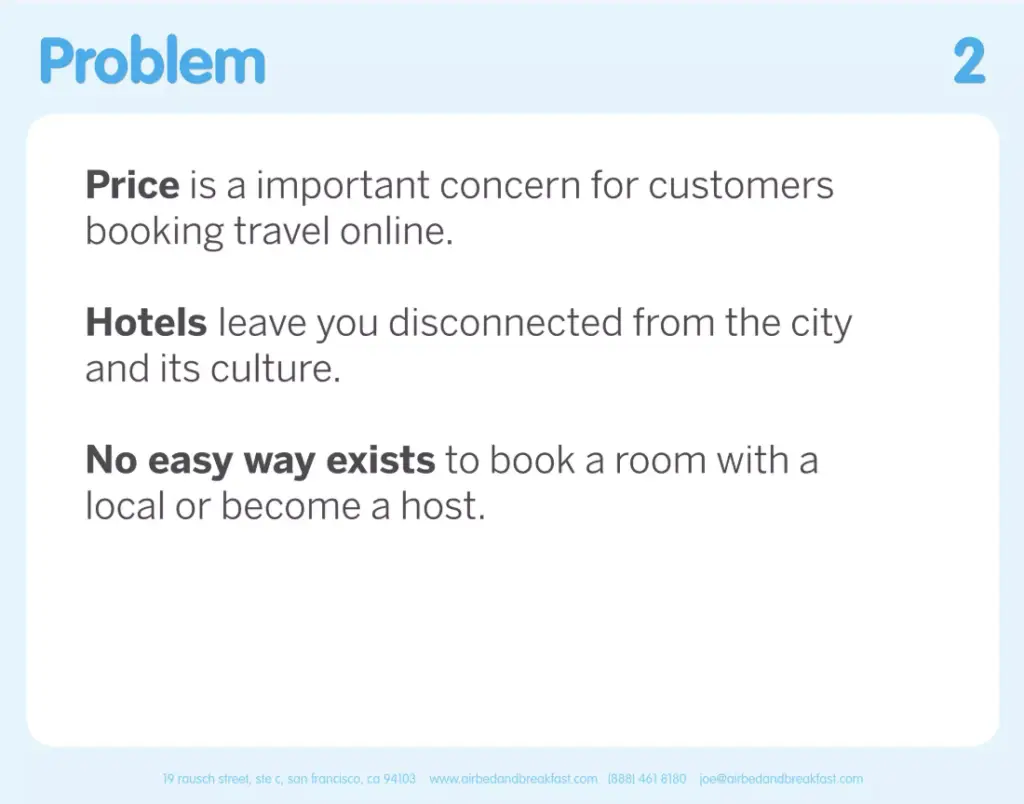
The core challenge remains the same, but here it’s presented visually and concisely to quickly align the audience with the need.
3 Solution
This slide gives a simple, approachable explanation of the mechanics behind your product or service. Show the core steps or components at a basic level. The goal is understanding, not detail. Simple visual aids work well here. End with a short statement that summarizes the output or “big payoff” customers receive.
Example: YouTube’s solution slide shows how it connects creators and viewers, making video sharing easy and accessible.
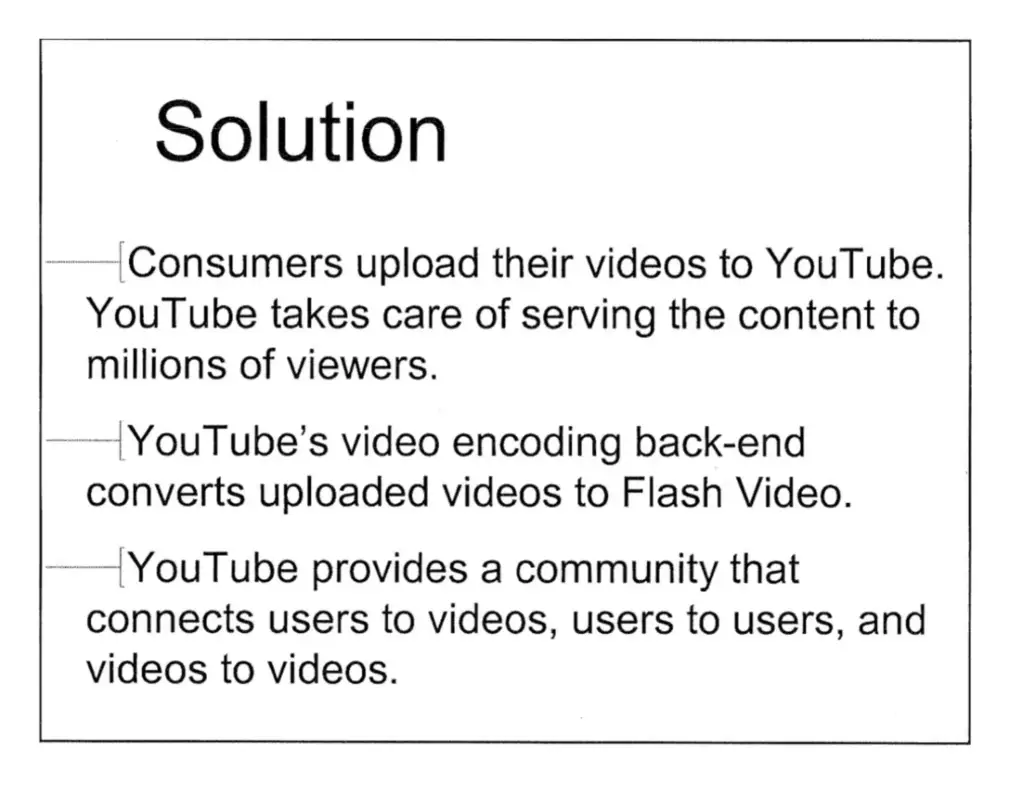
Pitch Element: Solution
Note that instead of just stating everything about your solution, the deck separates what it is from how it works, helping the audience understand both the idea and its feasibility.
4 How Your Solution Works
This slide gives a simple, approachable explanation of the mechanics behind your product or service. Show the core steps or components at a basic level. The goal is understanding, not detail. Simple visual aids work well here. End with a short statement that summarizes the output or “big payoff” customers receive.
Example: Uber’s technology slide briefly explains how mobile phone features such as scheduling, taking payments, and location services could combine for a unique and useful platform.
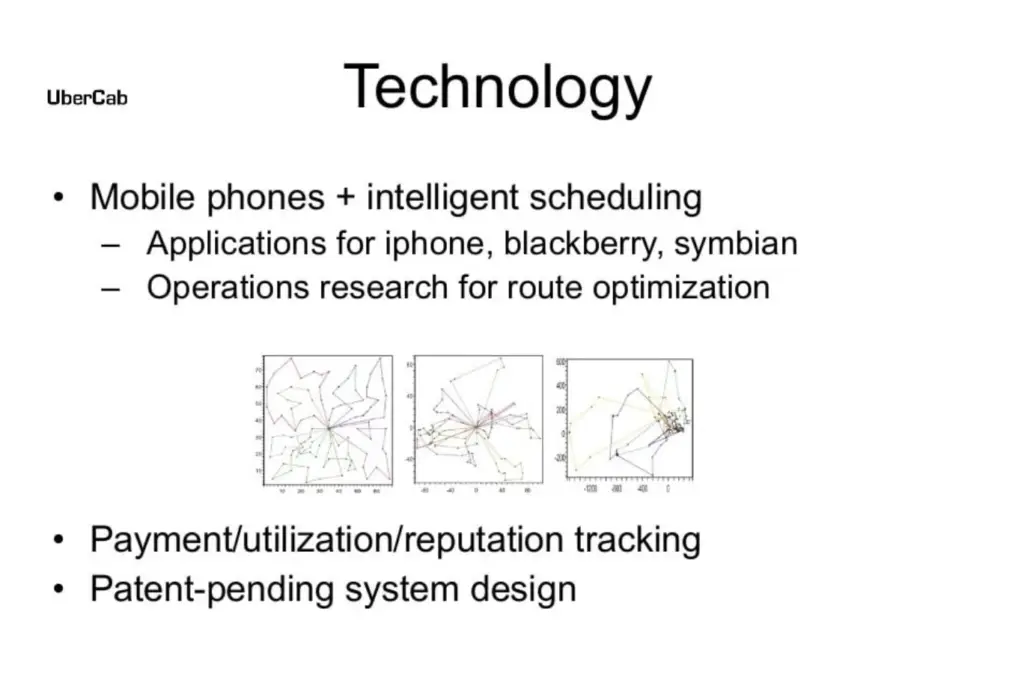
Pitch Element: Solution
As referenced in the previous slide, this one covers how your solution works.
Rubric Connection: This slide supports AI Application & Technical Feasibility and Proof of Execution.
5 Market Opportunity
This slide shows the size and potential of your market. Define who your target audience is, estimate how many people or organizations experience the problem, and highlight evidence that the market is growing. You want your audience to understand that this opportunity is real, meaningful, and worth pursuing.
Example: Square’s market opportunity slide showed the clear market potential, based on the mobile app payment landscape.
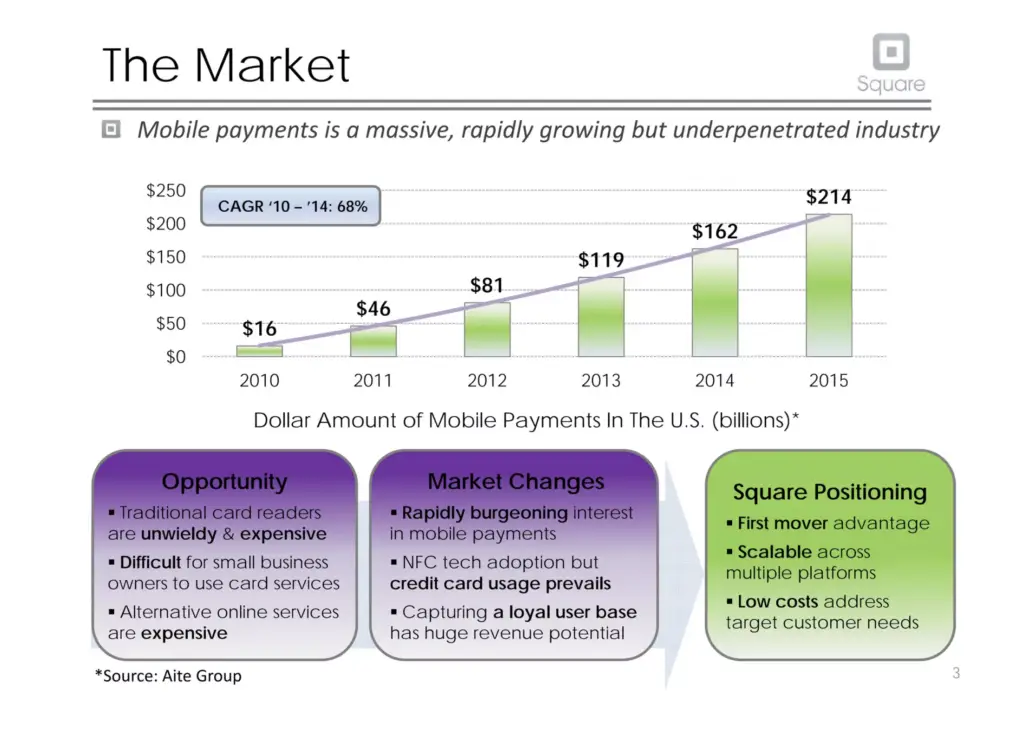
Pitch Element: Market or Audience
This slide expands on who your customers are and why there is demand, grounding your idea in a real and meaningful market.
6 Business Model
This slide explains how your startup makes money. Identify the primary way revenue is generated and give concrete examples of your expected revenue streams. You do not need detailed financial projections here. Your goal is to show that your monetization approach is logical, realistic, and grounded in how your industry works.
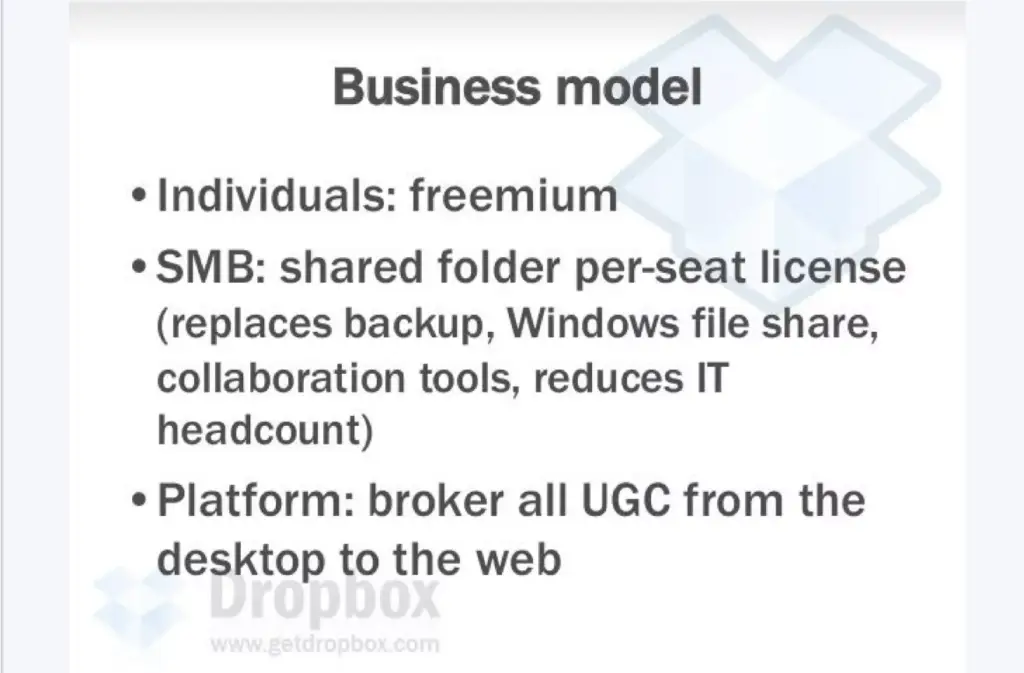
Example: Dropbox’s business model slide showed how they make money by offering a freemium model with premium upgrades for businesses to bring in revenue.
Pitch Element: Market or Audience
This slide shows how you plan to monetize the market you identified, demonstrating that you understand how businesses in this space make money.
Rubric Connection: This slide supports Business Viability.
7 Competitive Landscape/Unique Value Proposition
Identify the alternatives your target audience might choose, even if those alternatives are not direct competitors. Your goal isn’t to spotlight your competitors, but rather, show that you understand your competitive environment and industry. Then clearly state what makes your solution different and better. Your unique value proposition should help the audience see why customers would choose you.
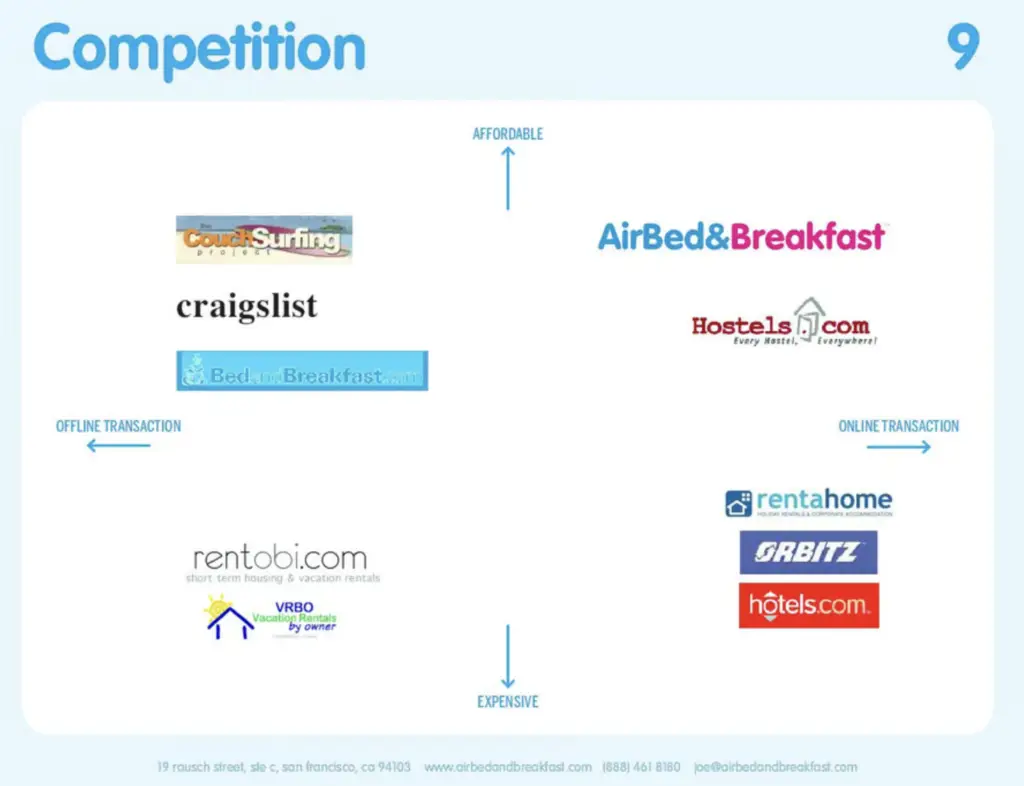
Example: This slide showed Airbnb’s key competitors, illustrating how it stood apart from both hotel chains and smaller rental services.
Pitch Element: Unique Value
Instead of restating your UVP as a sentence, consider showing why your solution fits your customer in a way others don’t. The goal is to help the audience see your advantage, not just hear it.
Rubric Connection: This slide supports Problem Validation.
8 Traction
This slide provides proof that you are making progress and will continue to do so. Highlight meaningful milestones, completed steps, or real-world validation. This could include prototypes, early users, partnerships, research insights, or other accomplishments. Include concrete numbers and statistics where possible (ex: number of users or MVP completed in X weeks, etc.) to clearly show evidence of execution. Traction is not about perfection. It is about momentum and evidence that your team follows through that your audience can believe in.
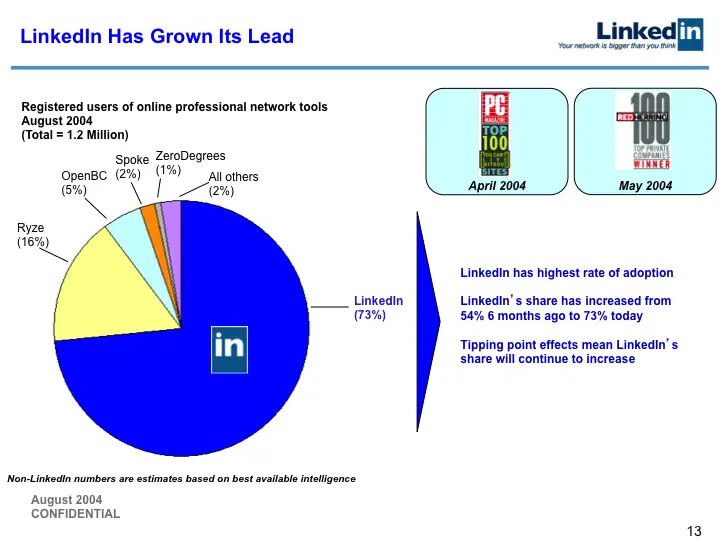
Example: This traction slide demonstrated LinkedIn’s fast market penetration, compared to its competitors.
Pitch Element: Traction & Growth
Traction doesn’t have to mean revenue. Early progress, learning, and action all count. Choose examples that show momentum and follow-through, even if they are small.
Rubric Connection: This slide supports Proof of Execution.
9 Customer Acquisition
This slide explains how you plan to reach and acquire customers/users. Identify your key customer segments, why they are a good fit, and the methods you will use to attract them. Show that your approach is achievable, not theoretical. Your goal is to convince the audience that you have a realistic plan to capitalize on the market opportunity.
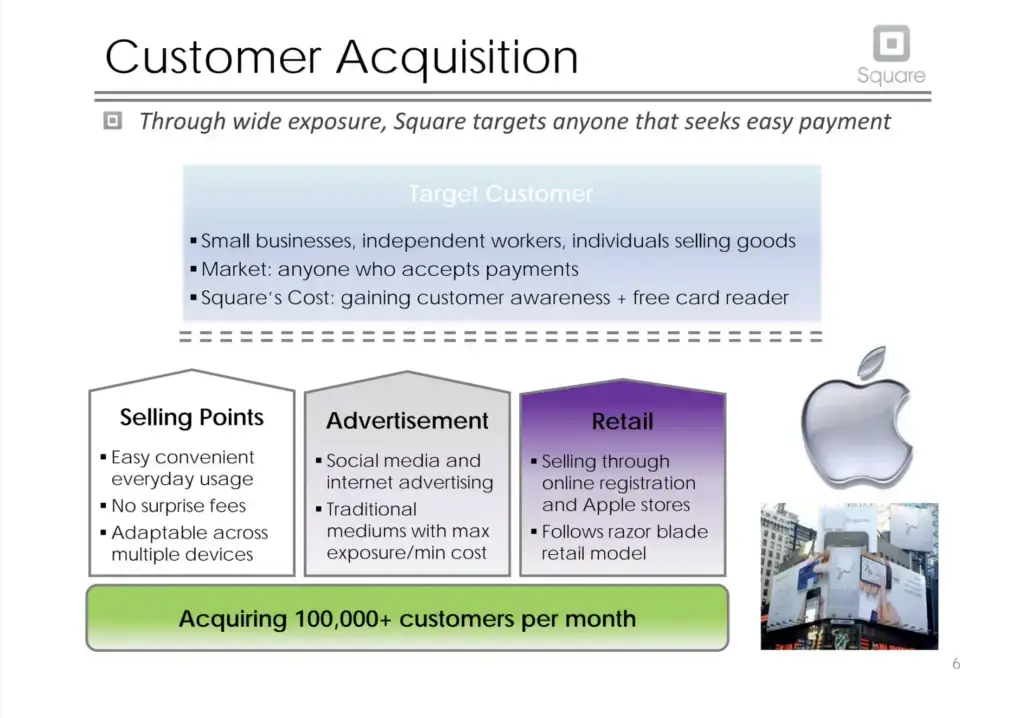
Example: This slide highlights who Square had as target users and how they planned to acquire them as customers,
Pitch Element: Market or Audience
You’ve identified who your audience is and why they care. This slide is where you show how you will actually reach those people.
Rubric Connection: This slide supports Business Viability and Proof of Execution.
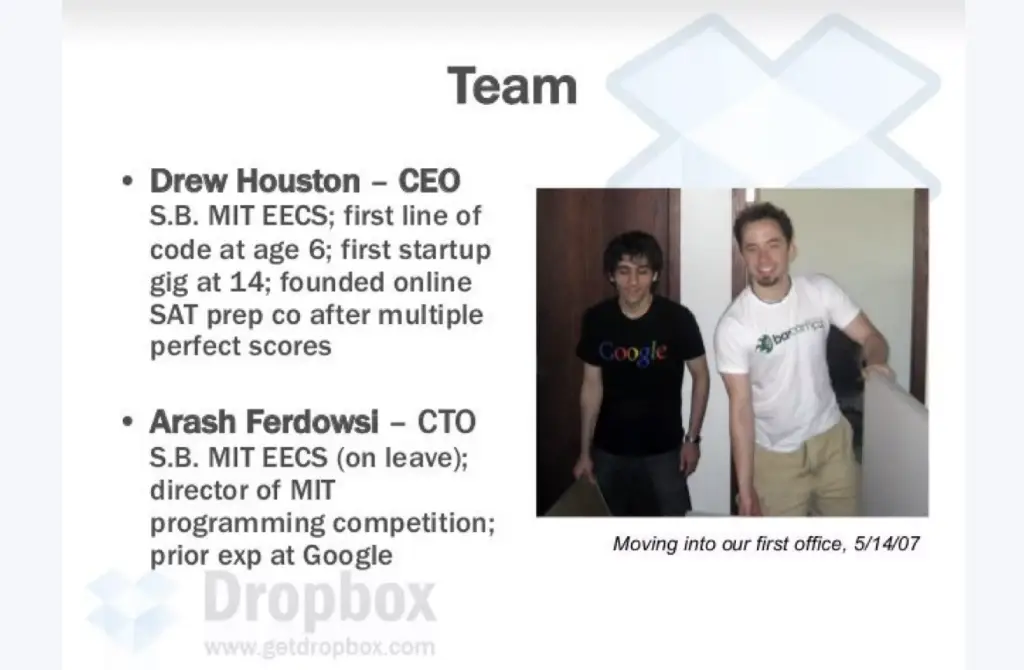
10 Team
This slide shows why your team is equipped to build this startup. Introduce key members and briefly explain what each person contributes to the company or their qualifications. Highlight relevant skills, experience, or achievements that directly support the startup’s needs. If important roles are still unfilled, acknowledge them and show that you have a plan to address those gaps.
Example: This slide highlights the key members of the initial Dropbox team, showcasing their backgrounds and roles within the company.
Rubric Connection: This slide supports Proof of Execution.
11 Closing
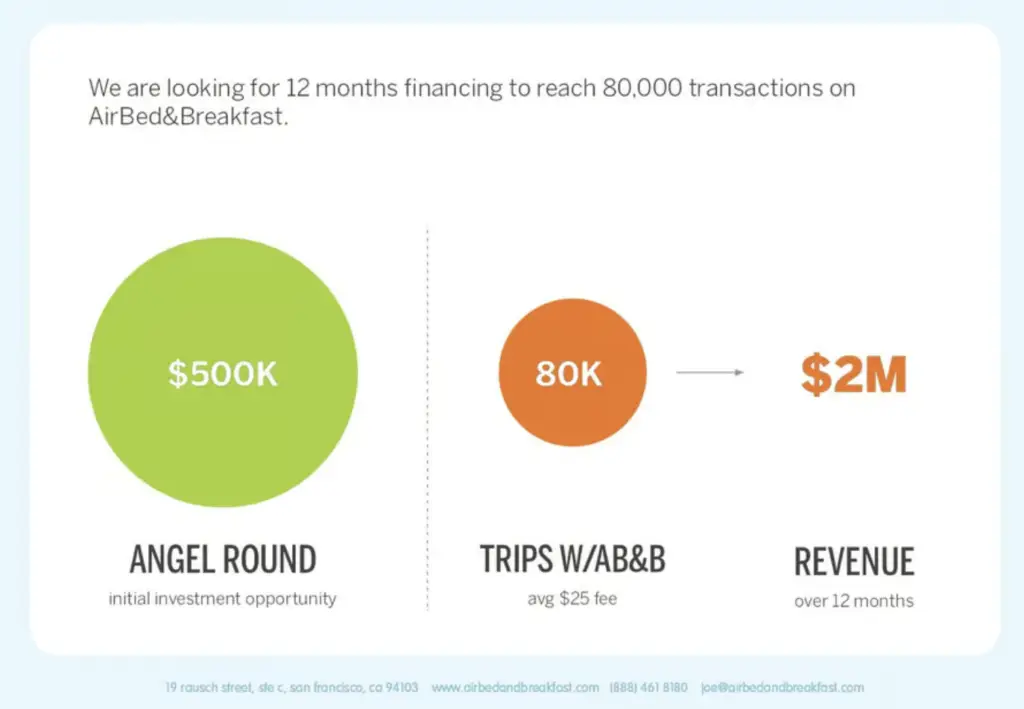
The final slide leaves your lasting impression. Thank the audience and provide a clear next step. State what you want from them, such as funding, partnerships, feedback, or sign-ups. Keep your call to action concise and actionable. Include contact information if it has not appeared elsewhere. This slide should act as your final hook, prompting the audience to take action.
Example: Airbnb’s pitch deck closing statement combines their funding request with clear goals.
Rubric Connection: Call to Action.
You may also consider making a new hook or altering your original one to better fit a closing slide.
Tips when Creating Slides
While you should aim to have succinct and clear slides, you should fill the slide notes with the details of your activities and research. For this program, judges will be advised to reference your notes when scoring. Give the judges a full sense of your work.
Keep It Simple and Impactful
A slide should communicate its idea within seconds. Prioritize clarity over decoration.
- Use short phrases, not paragraphs.
- Visuals should be used purposely to support your point
Stick to a Reasonable Slide Count
A general recommendation is 8-12 slides for your pitch deck. We’ve briefly discussed situations where you’ll need more, but again, be sure before you add more slides. If you add a slide, ask, “Does this actually move the audience closer to ‘yes’?”
One Idea per Slide
Your slides should be able to convey their idea at a glance. Give worthwhile ideas space to stand out and avoid overfilling your slides with too much information.
Branding
Your deck doesn’t have to be fancy, but it should feel cohesive and professional.
Your slides’ branding should follow basic design rules like having consistent colors and fonts, use only high-quality images, etc.. Check out the Additional Resources section for some more tips.
Use specific numbers
Vague language weakens credibility. When you say things like “a large market,” “strong interest,” or “many users,” the audience has no way to gauge scale, progress, or opportunity. Specific numbers signal research, precision, and seriousness.
What it looks like:
|
Vague
|
Specific
|
|---|---|
|
“There’s high demand.”
|
“42% of surveyed students report lacking affordable tutoring options.”
|
|
“We’re growing fast.”
|
“600 waitlist sign-ups in 3 weeks.”
|
|
“Huge market.”
|
“$1.2M annual spend on after-school learning tools.”
|
Iterate, Iterate, Iterate
Like with most things we’ve done, the pitch deck will grow and evolve as you gain experience. Remember to test your deck and presentation with different audiences and note which slides spark or lose engagement.
While you should aim to have succinct and clear slides, you should fill the slide notes with the details of your activities and research. For this program, judges will be advised to reference your notes when scoring. Give the judges a full sense of your work.
Tips when presenting your deck
Judges will initially evaluate your pitch deck virtually. If your team is chosen for demo day, you will present live. The following tips are meant to help you with live pitching, either for demo day (if selected) or in other live presentation situations.
Know your information
Slides support you, they don’t replace you. You should be able to explain every claim, number, or decision without reading off the deck. Imagine the worst case scenario where your slides were lost, you should still be able to give a compelling pitch.
Know your audience
Your pitch should adjust based on who’s listening and what they care about. Knowing what your audience wants will help you prioritize what points to spend more or less time on. Knowing the setting of your pitch can also help, especially when estimating the time you will have to fill. How would you present your pitch if you had 5 minutes? 30 minutes? 20 seconds? Be prepared for those scenarios. You can refer back to Storytelling for Entrepreneurs for audience specific tips.
Be prepared to answer questions
Even with the slide restrictions, you should be knowledgeable about all aspects of your startup and be able to answer any question thrown at you. You should also show a strong understanding of the industry your startup exists in. It would be best to try to predict and draft up potential questions people will ask you and prepare answers before pitching.
Exude Confidence
We’ve emphasized repeatedly that you’re building the audience’s confidence in your startup. This trust ultimately stems from you, the presenter. Your listeners are looking for someone to show conviction in their work and ability to figure things out.
Body language is a key aspect to this. Stand confidently, use natural gestures, and avoid fidgeting or closed-off postures. Your movements and posture communicate energy, conviction, and professionalism, all of which reinforce the strength of your pitch.
Rehearse
Rehearsal is where a good pitch becomes a great one. Even the strongest slides and smartest ideas can fall flat if the delivery feels hesitant, disorganized, or rushed. Practicing your pitch gives you control over timing, tone, and flow so the audience can focus on the message you want.
It can feel uncomfortable, but recording your practice session is one of the most effective ways to improve. Watching yourself reveals things you may not notice in the moment like speaking too quickly, avoiding eye contact, fidgeting, or using filler words. These small adjustments make a big difference in perceived confidence. Send the recording (or pitch live!) to other people as well. Outside feedback will greatly help you improve.
Demo Video
In addition to a pitch deck, you will also need to submit a demo video for this competition. The demo video should be a short (maximum of 3 minutes) display of your product and serve as proof that it’s at least somewhat functional.
Focus on showing that your product or service actually works and keep visuals simple. This means prioritizing core features that solve the problem, not covering every tiny detail.
💡 Capture Methods: Depending on your business, you’ll need to capture the workings of your product in different ways. For example, screen captures for software, recordings for physical devices, or showing staged service interactions.
Your pitch deck is a strategic tool that communicates the value, credibility, and potential of your startup. The goal isn’t just to inform, but to persuade. Every slide, every choice, and every word should work toward building confidence in your idea and in your team’s ability to bring it to life. Take the structure, guidance, and strategies from this lesson and start crafting a pitch deck that represents your vision with confidence and clarity.
ACTIVITY
Build Your Pitch Deck
Estimated Time: Multiple Days
Follow these steps to create a compelling pitch deck that showcases your startup’s potential and persuades your audience.
1. Select a platform to build your deck
Select a platform to build your deck. Some suggestions include:
You can use the Google Slides template that we used for the lesson. You are able to import this template onto any of the platforms listed above.
Note: Use the template to guide the structure and order of your slides, but don’t feel limited by its design. Make your slides visually appealing and tailored to your own style while keeping the content clear.
2. Create slides for essential sections
Note any trademarks that are similar to your project elements. Consider how close the similarity is and whether it could create legal issues. Remember to check the class of the existing trademarks. Trademarks with the same name can exist if they are in different industries.
3. Write core messages and main ideas
On each slide, write only the core message or main ideas. Review each main idea to ensure that you captured the most important thing you want to say about each slide topic and note down any accompanying visual aid you want to include. Once you’re satisfied with that flow, proceed to fill out the details and imagery.
4. Fill in the notes section
Additionally, for each slide, fill in the notes section. This should include what you plan to say out loud, context you didn’t put on the slide, or data points you need to reference. Think of the notes as your script.
For this program, these notes should be particularly detailed and thorough. Judges will be using your notes to score and decide the teams that will pitch in person on demo day.
5. Share and iterate
Share your first draft with your mentor for initial feedback. Then, show it to 2–3 other people to get additional perspectives. You should also practice actually presenting the pitch out loud. Make edits based on the feedback you receive.
Reflection
Take a moment and answer the following:

Difficulty
Inspiration
Additional Resources
Here’s some inspiration where you can find some great pitch decks from real companies. Take note of the purposeful inclusion of certain slides, what they do well, and what can be improved upon:
- https://bestpitchdeck.com/
- https://piktochart.com/blog/startup-pitch-decks-what-you-can-learn/
- https://www.alexanderjarvis.com/resources/collections/startup-pitch-deck-collection/
If you just need design inspiration, you can find templates here:
Check out this video for an overview on effective business branding: